Logging and plotting data from IoT devices
In this post I'll describe some techniques I use to log and plot data from IoT devices.
I will use as an example a power meter which I created some years ago to monitor my domestic power consumption.
A simple current integrator
I placed a cheap split-core current transformer (SCT-013-030) around the main live wire of my house, just after the electricity meter.
The output voltage of the transformer is proportional to the AC current flowing through the wire crossing the transformer: according to the datasheet, the output is in the range 0-1 V for a current in the range 0-30 A.
In order to monitor the power consumption, I built the following circuit:
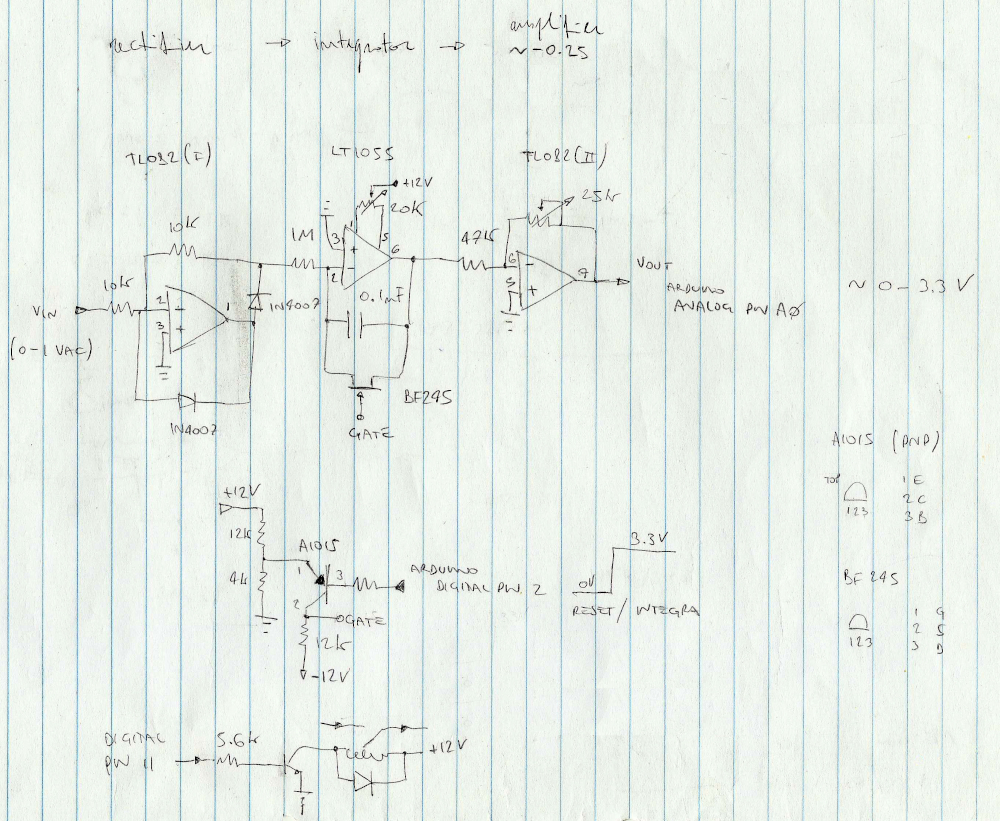
Such AC voltage passes through a "precision" rectifier and it is integrated using a decent JFET operational amplifier.
The output of the integrator is then conditioned to match the allowed input of an arduino microcontroller (using an Arduino Nano 33 IoT such range is 0-3.3V).
Since the integrating operational amplifier is used in an inverting configuration and the supply voltage is ±12V, a gain of approximately -0.25 is required.
The simple circuit sketched below is used to reset the integrator: basically a JFET transistor short-circuits the feedback capacitor when a digital pin (digital pin 2 in this case) is set high.
Principle of operation
This is the Arduino sketchbook I use to control the circuit above.
The principle of operation is a constant time integration: the circuit keeps integrating in a loop the input voltage for a fixed amount of time.
After the integration time is elapsed, the output voltage is measured by the internal ADC of the 32-bit SAMD21 processor.
In order to improve the precision of the measurement, a series of measurement is averaged.
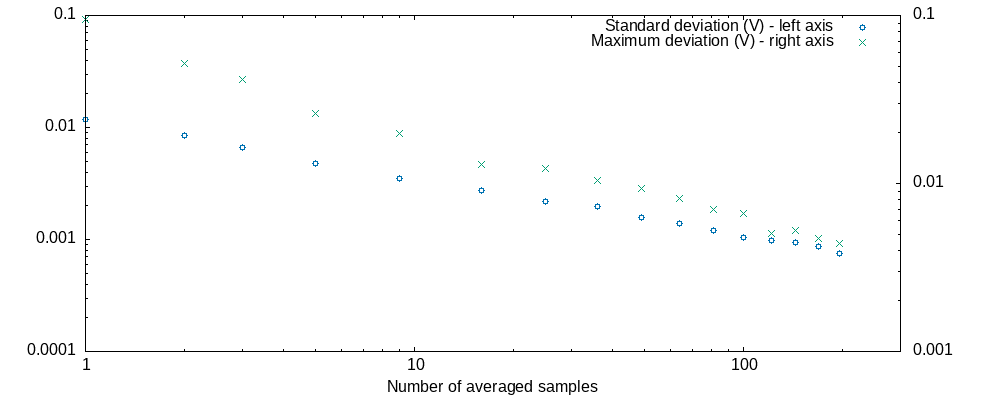
The number of samples I choose (90) is based on a quick experiment I made to understand how measurements from the ADC are reproducible.
The graph below shows the maximum deviation and standard deviation of a set of 300 averaged measurements of a stable voltage reference.
The x axis shows the number of averaged raw measurements that form each of the averaged measurements.
Sending data over a wireless network
The standard WiFi library provides a quick and dirty way to transmit data over a local network by means of UDP packets, as shown in the following example:
Udp.beginPacket(server_ip, server_port);
ADC_measure = Integrate(INTEGRATION_TIME);
Measure = String(ADC_measure, 6);
Measure.toCharArray(Measure_CA, 12);
Udp.write(Measure_CA);
Udp.write("\n");
Udp.endPacket();
Even if UDP is connectionless and there is no guarantee that datagrams are received, I found no problem using this technique in a small domestic context.
Logging data
Data can be easily received using a general purpose utility such as netcat.
In my linux box I use the following bash script to append data continuously to a text file, automatically named according to the current date:
#!/bin/bash
for((;;))
do
    out_file=$(date '+/home/pi/trend/corrente/%Y/%Y_%m_%d.txt')
    ncat -u -l -p 2390 -c "date -I'seconds'" -o /home/pi/trend/corrente/temp.txt
    # arrange values in a row
    paste -sd "\t\n" "/home/pi/trend/temp.txt" >>"$out_file"
Plotting data
I love using gnuplot to plot and analyze data. gnuplot is super flexible, can be scripted and it includes a powerful nonlinear least-squares fitting tool.
This is the script to produce the following plot:
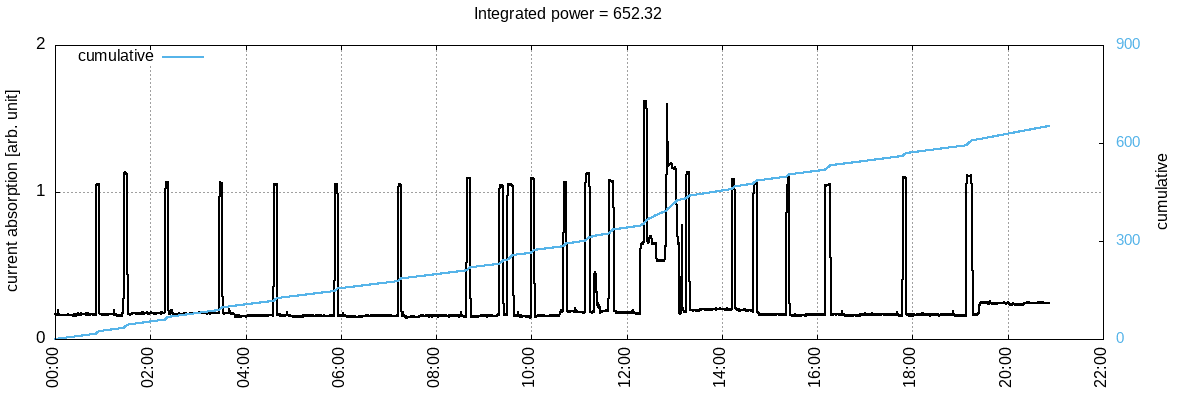
Note how gnuplot allows to add and display statistical calculations on the fly using the stat command (the rolling sum of values in this case).
See also the beautiful html version of the same plot.
TODO
- Discuss how to calibrate the device
- Add a measurement of the AC phase shift to calculate the active and reactive components