Amadeus hack
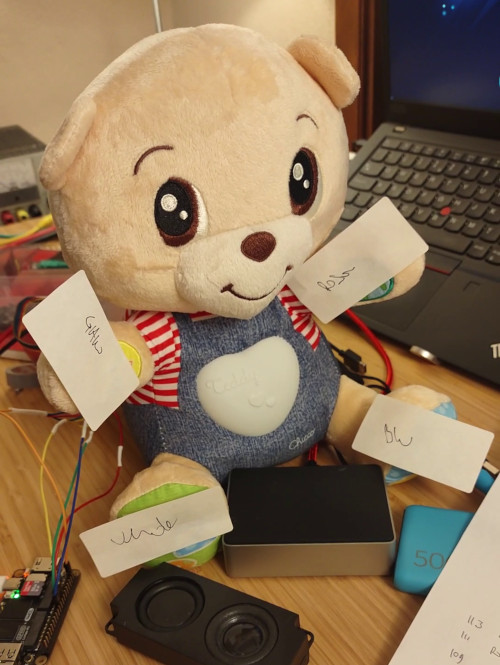
Lichee RV dock pinout
Hardware BOM:
- Chicco Teddy orso delle emozioni
- Sipeed Lichee RV
- Loudspeaker (4 or 8 ohm)
- 5V power bank
Software
Software BOM:
- OS: to date, the cleanest OS available seems to be the official Ubuntu port
- gpiod
- MPD: Music Player Daemon
gpiod
gpiod provides a set of handy command line tools to manage the GPIO interface. Out of the box, such tools require root permissions to work. To enable a standard user to run gpiod utilities, create a dedicated group and add the standard user to it:
sudo groupadd gpio
sudo usermod -G gpio <user>
Then create a new udev rule:
#!/bin/bash
cat <<EOF >/etc/udev/rules.d/60-gpiod.rules
    SUBSYSTEM=="gpio", GROUP="gpio", MODE="0660"
    SUBSYSTEM=="gpio", KERNEL=="gpiochip*", ACTION=="add", PROGRAM="/bin/sh -c 'chgrp -R gpio /sys/class/gpio && chmod -R g=u /sys/class/gpio'"
    SUBSYSTEM=="gpio", ACTION=="add", PROGRAM="/bin/sh -c 'chgrp -R gpio /sys%p && chmod -R g=u /sys%p'"
EOF
To identify the GPIO lines to be used in gpiod, run sudo cat /sys/kernel/debug/pinctrl/2000000.pinctrl/pinmux-pins:
Pinmux settings per pin
Format: pin (name): mux_owner|gpio_owner (strict) hog?
pin 32 (PB0): UNCLAIMED
pin 33 (PB1): UNCLAIMED
pin 34 (PB2): UNCLAIMED
...
For example, to set PB0 high, run:
sudo gpioset 0 32=1
Start-up sequence (through systemd):
- start the MPD daemon
- setup MPC and lights, play random song, sleep, fade out and stop playing
The following scripts will be running together:
Each monitor script has the following structure:
function action {
    # check if music is playing
    mpc | grep playing
    status=$?
    #if YES
    if [ "$status" == 0 ]; then
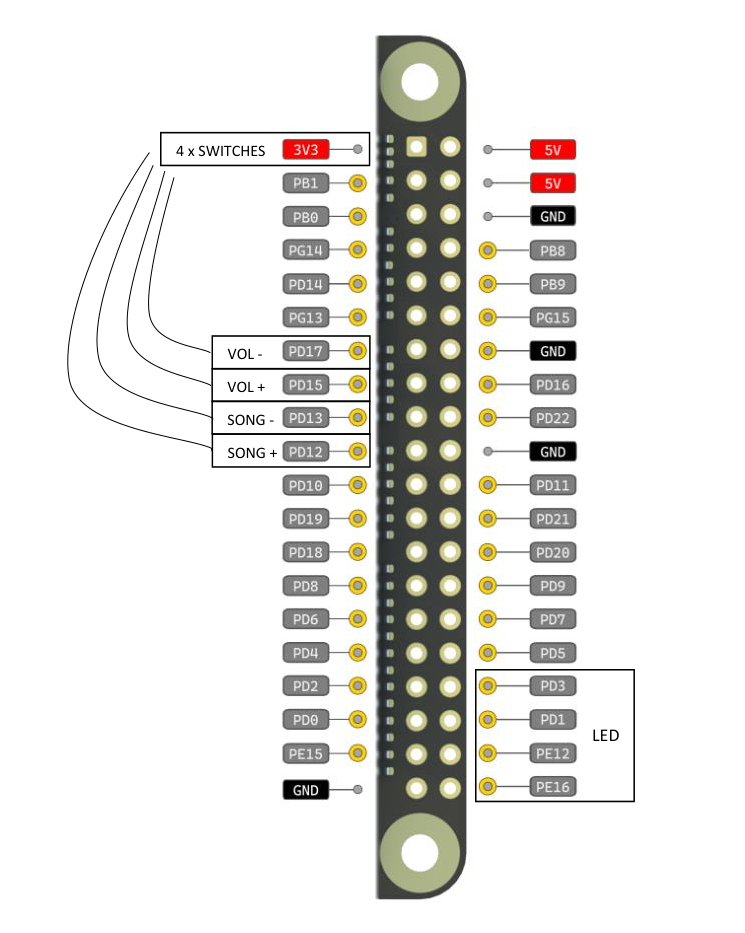
        mpc next    # bottom right: <PIN>=PD12
        mpc prev    # bottom left: <PIN>=PD13
        mpc volume +10  # upper right: <PIN>=PD15
        mpc volume -10  # upper left: <PIN>=PD17
    #if NO, resume playing
    else
        /bin/bash /home/ubuntu/scripts/replay.sh &
    fi
}

for((;;))
do
    gpiomon --bias pull-down -s -n 1 -r 0 <PIN> && action
    sleep 0.7
done